Using the sales pipeline
Track Spacestack bookings on a pipeline board, drag them between stages, read totals and weighted value, and customize stages under Settings, Sales pipeline.
The pipeline shows where each deal is in your sales process. Every booking sits in one stage. A new organization starts with New Lead, Qualified, Proposal Sent, Booking Won and Booking Lost, and you can change them to match how you sell.
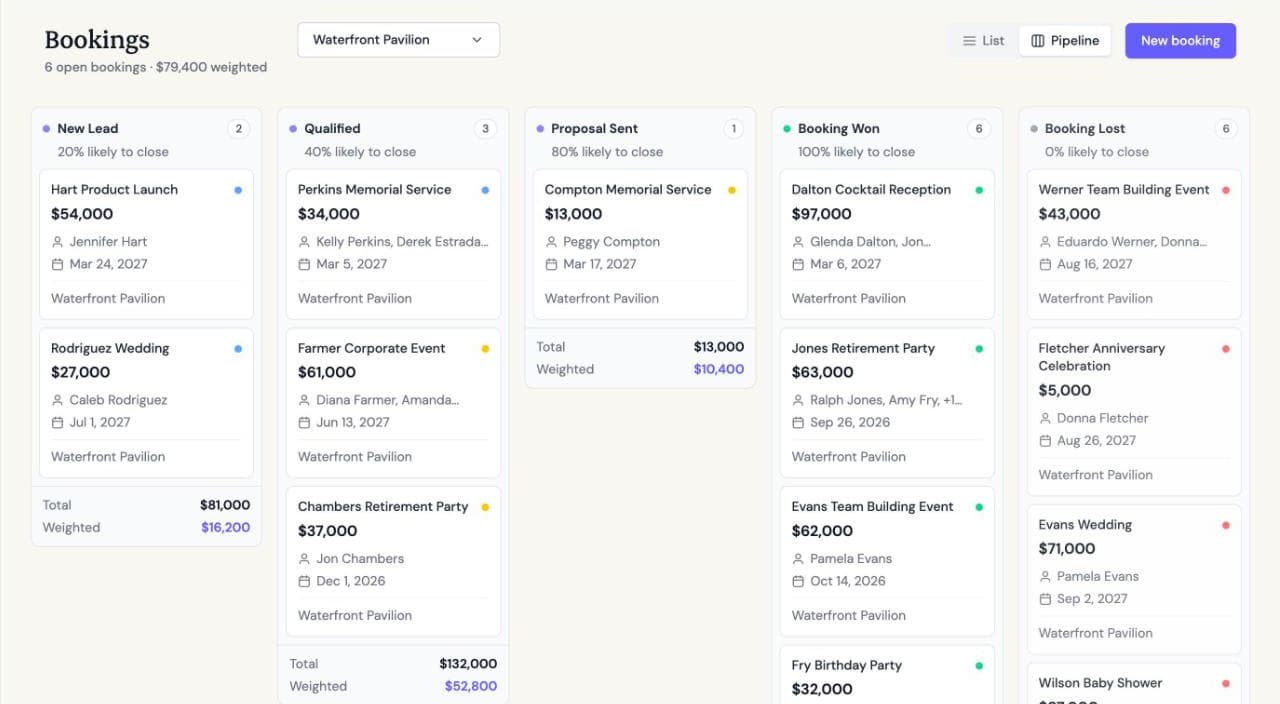
Open the board
Go to Bookings and click Pipeline in the view switcher at the top right. Spacestack remembers whether you last used List or Pipeline. With more than one venue, the venue selector narrows the board to one venue or shows All venues.
- The summary under the page title shows the number of open bookings and their weighted value.
- Each column shows its stage's win probability (“likely to close”), the number of bookings, and at the bottom the Total deal value and the Weighted value (total times probability).
- A column shows up to 100 cards. Older ones are counted but not shown; find them in the list view.
- Archived bookings aren't on the board.
Move a booking
- Drag the card to another column, or up and down within a column to reorder.
- Or open the booking and click a stage on the pipeline bar under the header.
Stages and statuses
Stages track the sale; statuses track the hold on your spaces. They meet at the ends:
| When you… | This happens |
|---|---|
| Move a booking to the win stage | It becomes Definite |
| Move it to the loss stage | It becomes Lost and its events release their spaces |
| Move it out of the win stage | It becomes Tentative |
| Move it out of the loss stage | It becomes a Lead, if its spaces are still free |
| Move it between other stages | Its status doesn't change |
| Change the status to Definite or Lost | It moves to the win or loss stage |
Customize your stages
Owners and admins can change the stages under Settings, then Sales pipeline.
- Click New stage, enter a Stage name, a Win probability (%) and a Stage type: Standard, Win or Loss.
- Click Edit on a stage to rename it or change its probability.
- Drag stages by the handle to reorder them.
- Click the trash icon to delete a stage.
Common questions
Where does a new booking start on the pipeline?
In the first stage, or in the win or loss stage if it was created as Definite or Lost. Website inquiries start in the first stage as leads.
Why did a booking jump to another stage?
Someone changed its status. Setting a booking Definite or Lost moves it to the matching stage, and reopening one moves it back into the open stages.
Can viewers move bookings?
No. Moving a booking changes it, which needs the owner, admin or staff role.
Was this article helpful?