Using reports
The Reports overview and library: what each figure means, every standard report with its filters and columns, date ranges, and exporting to CSV.
Reports show how your venue is doing and give you lists you can filter and export: every booking this year, leads by inquiry date, payments received last month. Everyone on the team can see reports. Owners and admins can export them as CSV.
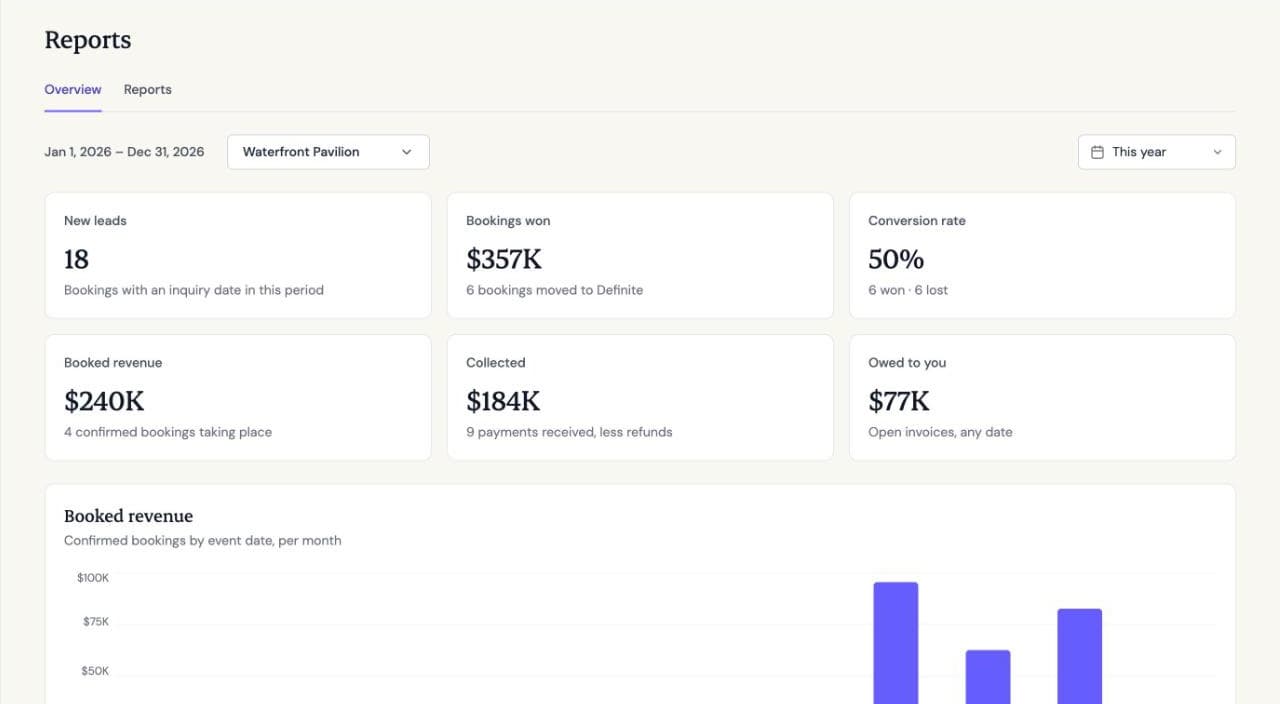
The Overview
Open Reports in the sidebar. The Overview tab shows headline figures for the date range you choose (this year to start).
| Figure | What it counts |
|---|---|
| New leads | Bookings with an inquiry date in the period |
| Bookings won | The value of bookings moved to Definite in the period, and how many |
| Conversion rate | Won as a share of won plus lost, for bookings decided in the period |
| Booked revenue | The value of Definite bookings whose events take place in the period |
| Collected | Payments received in the period, less refunds |
| Owed to you | What's still due on open invoices, whatever their date |
Below them, Booked revenue is charted by week for ranges under about three months and by month for longer ones, and Leads by status shows where the period's leads stand today. A booking's value is the total of its items once it has any, and its deal value until then. Archived bookings aren't counted.
Date ranges
Click the date range button to choose This month, Last month, This quarter, Year to date, This year, Last year or Last 12 months, or set a Custom range of up to five years. Individual reports also offer All time. Dates follow your venue's time zone, so everyone on the team sees the same figures.
The report library
The Reports tab lists the standard reports. Open one to see its rows, 50 to a page, with a Total row for money columns that covers every page. Use the dropdowns next to the date range to filter. Click Edit columns to show, hide and reorder columns.
| Report | Dated by | Filters | Columns (optional ones in brackets) |
|---|---|---|---|
| Bookings | Event date | Status, Owner, Source | Booking, Status, Primary contact, Event date, Owner, Booked value, Paid (Email, Phone, Account, Venue, End date, Events, Inquiry date, Last status change, Source, Balance) |
| Leads | Inquiry date | Status, Owner, Source | Inquiry date, Booking, Contact, Email, Source, Status, Won or lost on, Owner, Booked value (Phone, Days to decide, Event date) |
| Events | Event date | Status | Date, Starts, Ends, Event, Status, Spaces, Expected, Guaranteed (Booking, Contact, Venue, Actual) |
| Payments | Payment date | Status, Method | Date, Booking, Client, Invoice, Method, Status, Amount, Net (Type, Refunded, Note, Recorded by) |
| Invoices | Issue date | Status | Invoice, Issued, Due, Booking, Billed to, Status, Total, Paid, Balance |
| Contacts | Date added (all time to start) | None | Name, Email, Phone, Account, Bookings, Won value (Title, Added) |
- Bookings, Leads, Events and Invoices leave out archived bookings.
- Source is Added by the team, Website inquiry form or Converted from a tour.
- Payment methods are Card, Bank transfer, Check, Cash and Other. Failed payments are dated when they were attempted.
- Draft invoices have no issue date, so they appear only with All time.
If you have more than one venue, reports follow the venue selector at the top of the page; choose All venues for everything. The Contacts report always covers your whole organization, since contacts are shared between venues.
Exporting to CSV
On any report, click Export CSV. The file has exactly what's on screen (the same date range, filters and columns) and every page of it, not only the one you're looking at. It opens in Excel, Numbers or Google Sheets.
Common questions
Why doesn't Bookings won match the dashboard's Won this month?
The dashboard tile adds up deal values for the current month. Reports use each booking's booked value (its items' total once it has items) for the range you choose.
Can staff export reports?
No. Exporting is for owners and admins. Ask one of them to export it for you; staff can still view every report on screen.
Can I build my own report?
Not yet. You can choose the columns, filters and date range of each standard report, and export it to work with in a spreadsheet.
Was this article helpful?