The Items tab: what you're selling on a booking
Use a booking's Items tab to list what the client is buying, with options, tax, service charge and discount. Proposals, contracts and BEOs show these items.
The Items tab is the booking's price list: venue fees, menus, bar packages, rentals, staffing. Proposals, contracts and banquet event orders show these items, so you set them up once and every document agrees.
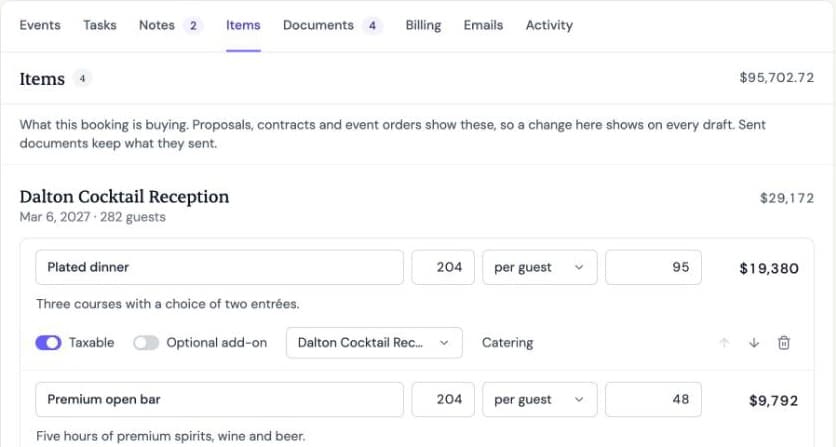
How the tab is laid out
- One section per event, with its date and guest count. Items here are for that event.
- Whole booking, for things not tied to one event, like a venue fee or a coordinator. With no events, this section is called Items.
- Options, for choices where the client picks one, like a package or a menu. Only the chosen one counts toward the total.
- Totals, with tax, service charge and discount, and the booking total.
Add items
- Open the booking's Items tab.
- In the right section, click Add from catalog and search your catalog, or click Add a custom line to type one in.
- Set the Quantity, Unit and Price. The line total works itself out.
- Optionally add a description, a group name to list lines together under a heading, and switch Taxable off for untaxed lines.
- To move a line to another event or to the whole booking, use the event dropdown on the line.
Changes save as you go. A line with no name isn't kept, and a negative price is refused: use the discount for money off. A booking can have up to 200 items.
Options and add-ons
- In Options, click Add an option or Add from catalog. The first option you add is the chosen one; click Choose this one on another to switch.
- For an extra the client can take or leave, switch on Optional add-on on a regular line. Included to start decides whether it starts switched on.
Tax, service charge and discount
Under Totals, set a Tax rate, a Service charge rate and a Discount amount, each with the label the client sees. Switch on Charge tax on the service charge if your area taxes it. New bookings start with the defaults from Settings, then Documents & payments.
How items reach documents
- Draft documents show the booking's items live. Editing the pricing in a draft changes the booking's items too, and every other draft.
- Sent documents keep what they sent. Changing items afterwards doesn't touch them; send a new version if the client needs the update.
- A document about some events shows those events' items plus the whole-booking ones, with the discount shared out in proportion.
- The booking's Total in the Deal card follows the items.
Common questions
If I change a catalog price, do bookings update?
Items are copied onto the booking when you add them, so later catalog changes don't rewrite existing bookings.
Why didn't my sent proposal change when I edited the items?
Sent documents keep a copy of what was sent. To show the client new pricing, make a new version. See Changing a document after it's sent.
Was this article helpful?