How documents work
Proposals, contracts, BEOs and questionnaires in Spacestack: categories, blocks, the draft to completed lifecycle, and what your client sees.
Every document you send a client in Spacestack (a proposal, a contract, a banquet event order, a questionnaire, or anything else) is built the same way: a page made of blocks, attached to a booking, sent as a link to your client portal. The client reads it there, chooses options, answers questions, signs and sees what they owe.
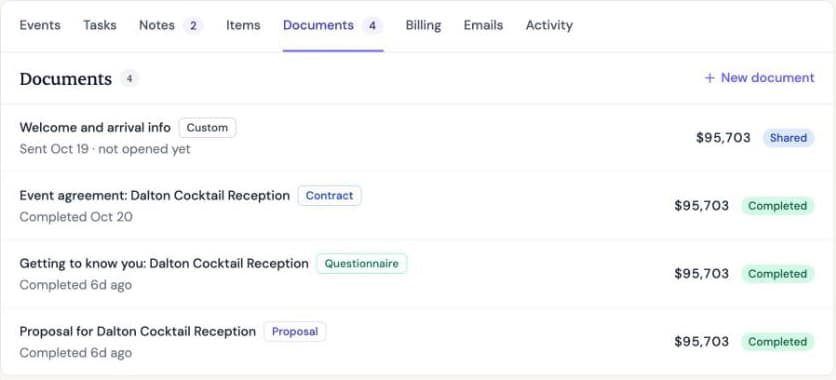
Categories
A category names the document and decides what signing it does. Every workspace starts with these:
| Category | Offers to confirm the booking when signed | Expires after the respond-by date |
|---|---|---|
| Proposal | Yes | Yes |
| Contract | Yes | Yes |
| Banquet event order | No | No (shows as overdue) |
| Questionnaire | No | No (shows as overdue) |
| Custom | No | No |
The first four are built in and can't be renamed, hidden or deleted. Custom is a starting point you can rename, change or delete, and owners and admins can add categories of their own. See Templates and document categories.
The lifecycle
| Status | What it means |
|---|---|
| Draft | Still being written. Only your team can see it, and everything can change. |
| Sent | Sent by email or shared as a link. The content is now frozen. A document with nothing for the client to do shows as Shared instead. |
| Viewed | The client has opened it at least once. |
| 1 of 2 signed (and so on) | Some of the required signers have signed; it is waiting on the rest. |
| Completed | Everyone required has signed, the client submitted their answers, or you marked it completed. |
| Declined | The client declined it, optionally with a reason. |
| Expired | A proposal or contract passed its respond-by date without an answer. |
| Replaced | A newer version was sent and took its place. |
An open document past its respond-by date also shows a red Overdue chip. You can see all of this on the Documents page (tabs All, Drafts, Awaiting response, Shared, Completed, Declined, Expired) and on each booking's Documents tab.
Sending freezes the document
The moment a document is first sent (or you create its link), Spacestack takes a copy: merge fields are filled in, the booking's events, contacts and items are copied in, and that copy is what the client sees from then on. Later changes to the booking don't change it. To change a sent document, you make a new version. See Changing a document after it's sent.
What the client sees
- An email with a button: Review and sign if the document has a signature block, otherwise View proposal, View contract and so on.
- The document in your client portal, after signing in with their email address. Only people who can see the booking in the portal can open it.
- Your theme, your logo and tagline, and only the blocks that aren't marked team only.
- Buttons to choose options, answer questions, sign (Sign and accept) or submit (Submit), and to Decline a document that asks for a signature.
- A Print / PDF button, and after signing, a Download signing evidence link.
After it's signed
- Any add-ons and options the client chose are written back to the booking's items.
- If the category offers to confirm the booking and the booking is still a lead or tentative, the booking page asks Mark the booking as Definite? Nothing changes until you choose Mark as Definite (or Not now).
- A proposal or contract with a payment schedule and something to bill creates an invoice, sent straight away or left as a draft for you. See How invoices and payments work.
- The booking owner and whoever made the document are notified.
Common questions
Can a document exist without a booking?
Yes, as a draft. Merge fields show as placeholders until you attach a booking, and you have to choose one before it can be sent.
Can I delete a document?
Drafts, and sent documents nobody has acted on, can be deleted from More. A completed document, one someone has signed, one the client attached files to, or one with payments or an invoice is kept as a record.
Does signing a proposal change the booking's status?
Not by itself. You're asked whether to mark the booking Definite, and it only changes if you say yes.
Was this article helpful?