Reading your dashboard
What every tile and panel on Spacestack's Home page shows: the setup checklist, pipeline, inquiries, tours, events, your tasks and recent activity.
Home is the first page you see after signing in. It greets you with today's date and pulls together what needs attention now. Click any tile or panel link to jump to the full list behind it.
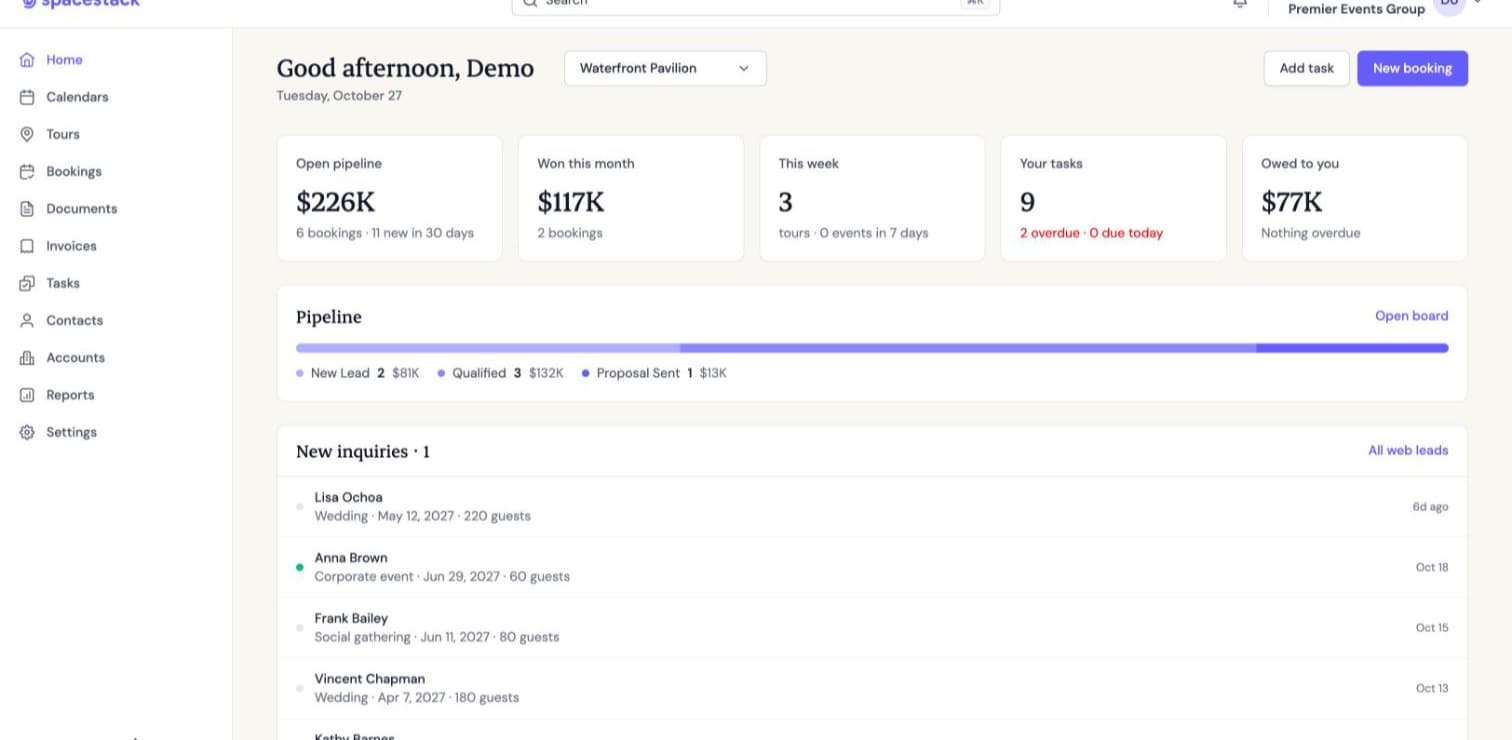
If you have more than one venue, the venue selector next to the greeting narrows the page to one venue; choose All venues for everything. New booking in the top corner opens the new booking window.
Get set up
During the free trial, Home shows a Pick up where you left off card that opens Setup, the trial's checklist in the sidebar. Once a plan is chosen, a new organization sees a Get set up checklist instead, with six steps: Add your spaces, Add what you sell, Put an inquiry form on your website, Choose how clients pay, Invite your team and Create your first booking. Each ticks itself off once it's done, by anyone on the team, and the list disappears when all six are complete. Click the × to hide it sooner; it stays hidden in that browser.
The tiles
| Tile | What it shows |
|---|---|
| Open pipeline | The deal value of all lead and tentative bookings, how many there are, and how many bookings have an inquiry date in the last 30 days |
| Won this month | The deal value and number of bookings that moved to Definite since the 1st of this month |
| This week | Scheduled tours and events in the next 7 days, today included (events on lost bookings aren't counted) |
| Your tasks | Your open tasks (not subtasks), with how many are overdue and due today. It turns red when something's overdue. |
| Owed to you | What's still due on open invoices, with how many are overdue and for how much |
Pipeline
A bar split by your open pipeline stages, with the number of bookings and their deal value in each. Won and lost stages aren't shown. Open board takes you to the pipeline. See Using the sales pipeline.
New inquiries
The five most recent website inquiries (spam left out), with the event type, date and guest count when the form asked for them. A green dot means nobody has opened that lead's booking yet; opening it clears the dot. The heading counts new ones. All web leads lists every booking that came from your form. Until you have inquiries, this panel offers to set up your form.
Upcoming tours, events and your tasks
- Upcoming tours: the next five scheduled tours. All tours opens the full list.
- Upcoming events: the next five events on bookings that aren't lost, with time, spaces and guest count. Calendar opens the calendar.
- My tasks: up to six of your open tasks, soonest due first. Tick one off right there, or click it to open it. All tasks opens the Tasks page.
Recent activity
The last 10 things that happened across your organization, from new bookings to signed documents. See The activity timeline for what's recorded.
Common questions
Why does Open pipeline show $0 when I have leads?
It adds up deal values. Set a deal value on your lead and tentative bookings (under More details or on the booking's Deal card) and they'll count.
I hid the setup checklist. How do I get it back?
It's hidden in that browser only. Open Spacestack in another browser, or clear this site's stored data, and it shows again until every step is done.
Was this article helpful?