Turning a tour into a booking
Record a tour's outcome in Spacestack (completed, no-show or cancelled), convert it into a booking, and what happens to a tour that's part of an existing lead.
After a tour, record how it went. If the client wants to go ahead, convert the tour so the booking and the tour are linked and your conversion numbers stay right.
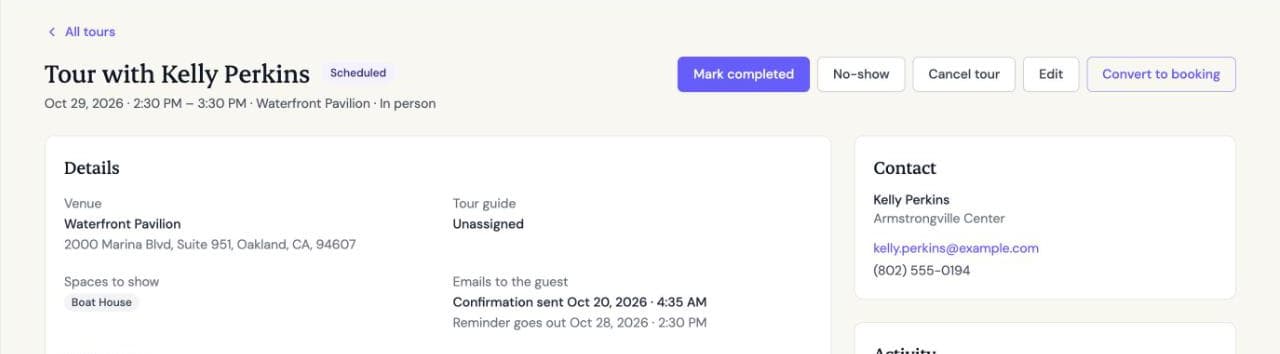
Record the outcome
| Button | Status | Emails the guest? |
|---|---|---|
| Mark completed | Completed | No |
| No-show | No show | No |
| Cancel tour | Cancelled | Yes, if they were sent a confirmation and the tour hasn't happened yet |
These buttons are on the tour page while it's Scheduled. Mark completed is also in the calendar's tour preview. Picked the wrong one? Click undo on the message that appears, or Reopen tour to put it back to Scheduled.
Convert to booking
Convert to booking appears on a Scheduled or Completed tour that hasn't been converted yet. What it does depends on whether the tour is already part of a booking.
The tour is part of an open lead
If the tour is linked to a Lead or Tentative booking (shown in the Part of booking card), clicking Convert to booking marks the tour completed, links it as converted, and takes you to that booking. Nothing new is created: the deal carries on.
The tour isn't part of an open booking
- Click Convert to booking. The New booking window opens with “From a tour. The contact and venue are filled in for you.”
- Name the booking and add the event date, spaces and anything else you know.
- Click Create booking.
The booking is created with the source “Converted from a tour”, the tour is marked completed and linked to it, and you land on the new booking.
After converting
- The tour shows a Converted card with the date, and a View booking button.
- On the Tours list, converted tours carry a Booked tag.
- A converted tour can't be reopened or deleted: the booking is the record now.
Common questions
Can I convert a tour that was a no-show or cancelled?
Not directly. Click Reopen tour first, then Convert to booking. A cancelled tour also can't be marked completed until it's reopened.
Does converting change the booking's status?
No. A new booking starts at the status you choose in the window (Lead by default). An existing lead keeps its status; set it to Tentative or Definite when you're ready.
Was this article helpful?